
RIP,OSPFandEIGRPare all different but they have one thing in common; they want to find the shortest path to the destination There is only one routing protocol we currently use on the Internet which is BGP.
BGPunlike other protocols , is about how the world reaches out to us.
Take a look at the picture below.

Say CUSTOMER has a few Web servers which are accessible on Public IP Addresses.
- This Public IP Address if allocated by
ISP1will make the traffic always come viaISP1 - The above holds true for
ISP2 - We have no control on how people on the internet come to us.
This is where we have our
OWN IP Addressspace allocated aBGPASN which can beadvertisedto both ISPs
About BGP
An AS is a collection of networks under a single administrative domain. The Internet is nothing more but a bunch of autonomous systems that are connected to each other. Within an autonomous system we use an IGP like OSPF or EIGRP. For routing between the different autonomous systems we use an EGP (external gateway protocol). The only EGP we use nowadays is BGP.
Autonomous systemnumbers are 16-bit which means we have AS 1 up to 65535. There’s also a private range (64512 – 65535) you can use for non-internet usage. Since January 2009 we can also use 32-bit numbers for autonomous systems.
BGP has two flavors:
External BGP: between autonomous systemsInternal BGP: within the autonomous system.
External BGP is to exchange routing information between the different autonomous
Again, in the above picture ; the ISPs (ISP1 and ISP2) can provide us one of the following :
Default Route: A default route to the customer pointing it to the ISP router. In this case customer network has zero visibility of what’s on the internet and cannot take intelligent routing decisions itself.Default Route and Partial Routing Table: A default route along with the the networks know to the ISP are advertised to theCustomer. This case is better than theDefault Routeonly option as we know little more than before.Full Routing Table: This is the best case option , but know that this requires a lot of CPU and power on the customer router.
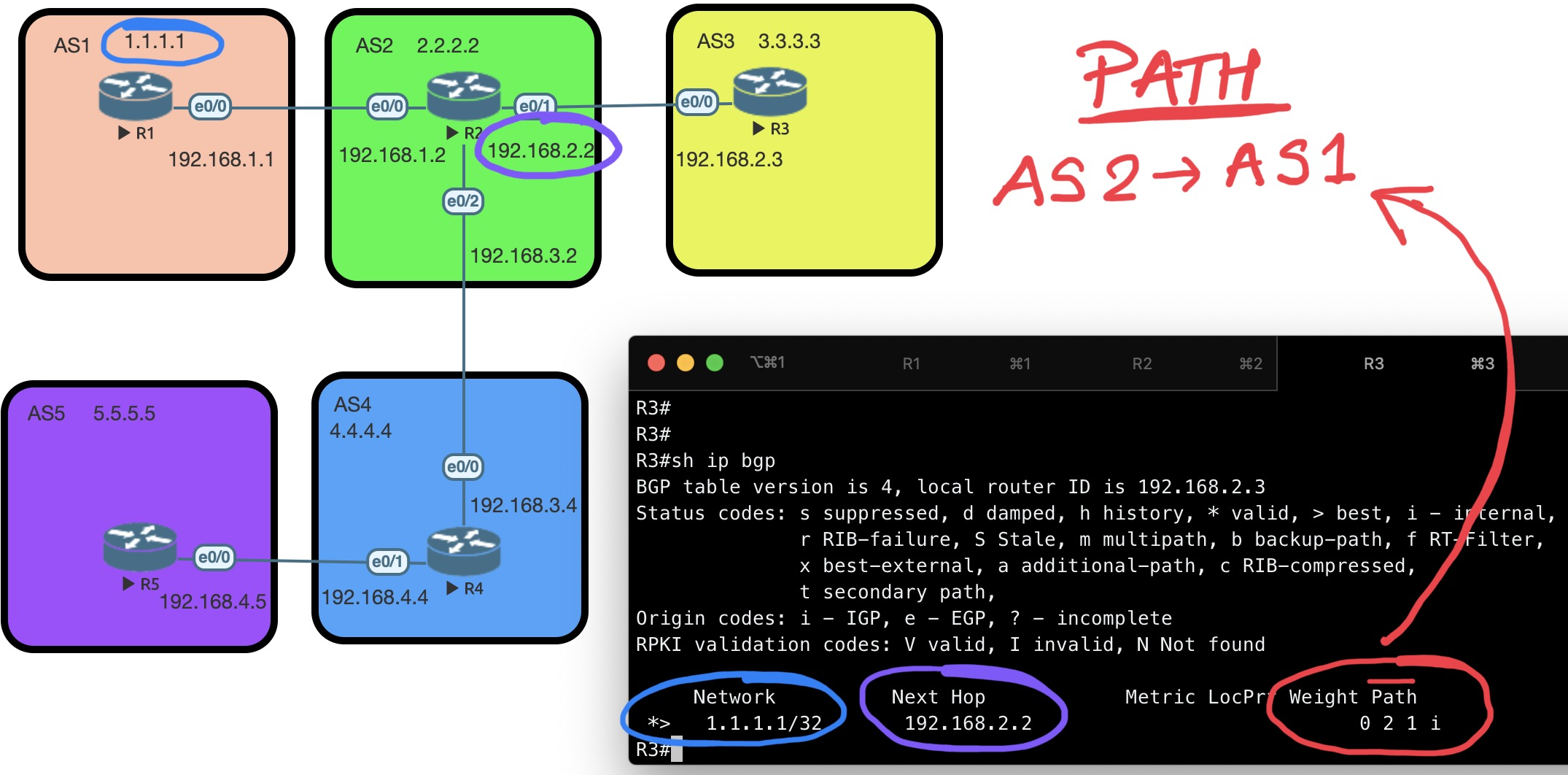
Why do we call BGP a path-vector routing protocol?
In the BGP routing table , instead of just the next hop for a specific network like other protocol (EIGRP, OSPF) we have the path (denoted by AS numbers).
This is what that means:
In the example below ; we are on R3 and looking at the routing table on how to reach 1.1.1.1 which is on R1. As you can see the PATH on R3 lists out the AS numbers in sequence it is going through for 1.1.1.1
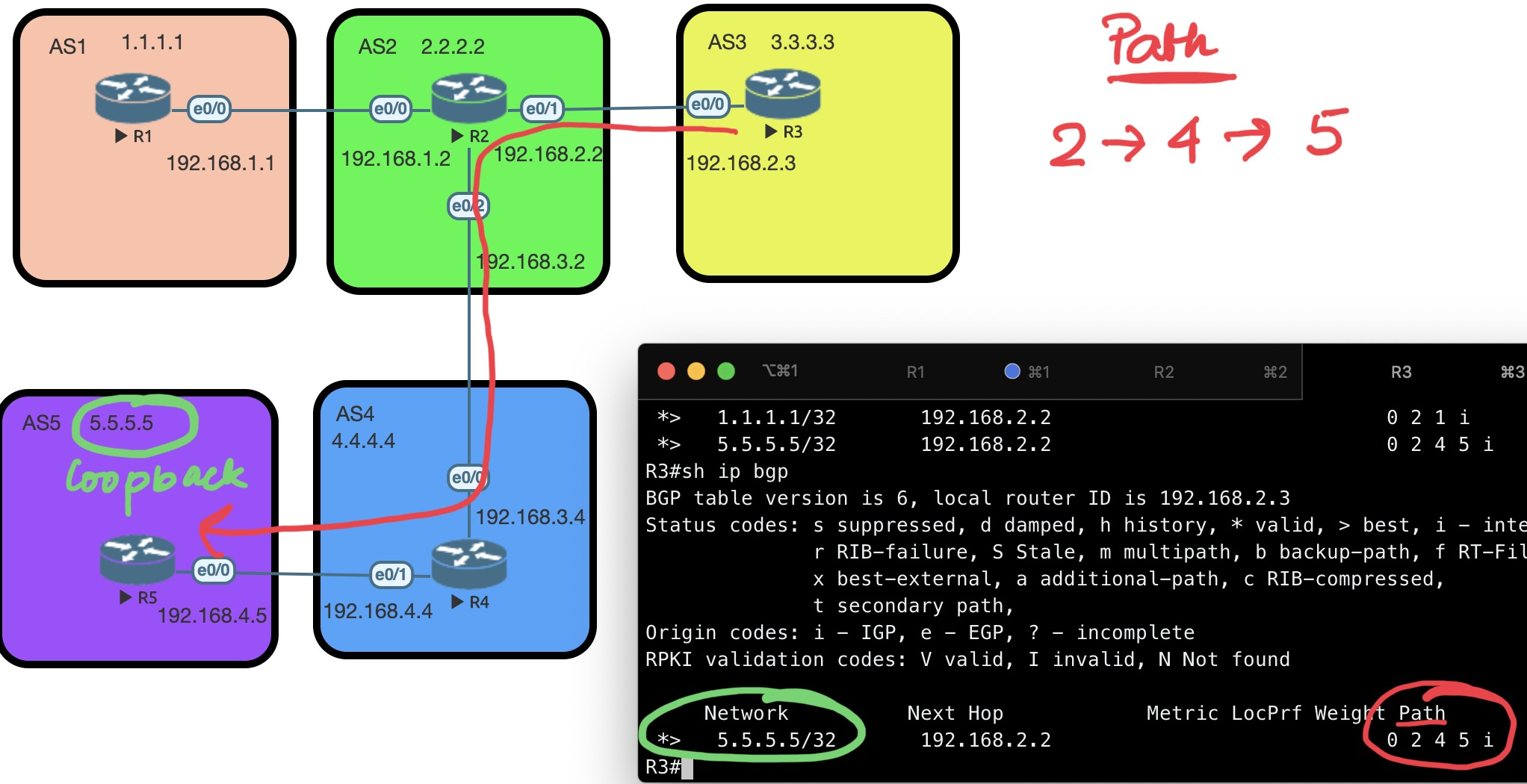
In the next example, on R3, the routing table shows the path to 5.5.5.5 (on R5) with each AS number listed in sequence.
#R1
router bgp 1
 neighbor 192.168.1.2 remote-as 2 # First you configure the Remote AS
 network 1.1.1.1 mask 255.255.255.255 # Second you adverstise the Route into BGP

#R2
router bgp 2
 bgp log-neighbor-changes
 neighbor 192.168.1.1 remote-as 1
 neighbor 192.168.2.3 remote-as 3
 neighbor 192.168.3.4 remote-as 4

...
BGP uses TCP port 179
BGP States during Connection
Here are all the BGP states that we have:
Idle: BGP process has been shutdown or it is waiting for the next retry.Connect: BGP is waiting for the TCP connection to complete.Active: TCP connection is ready but no BGP messages have been sent yet.Opensent: Open message has been sent but we didn’t receive one yet from the neighbor.Openconfirm: Open message has been sent and received from the other side.Established: All parameters match, we have a working BGP peering and we can exchange update messages with routing information.
What is ebgp-multihop
| Direct Peering | EBGP Multihop Peering |
|---|---|
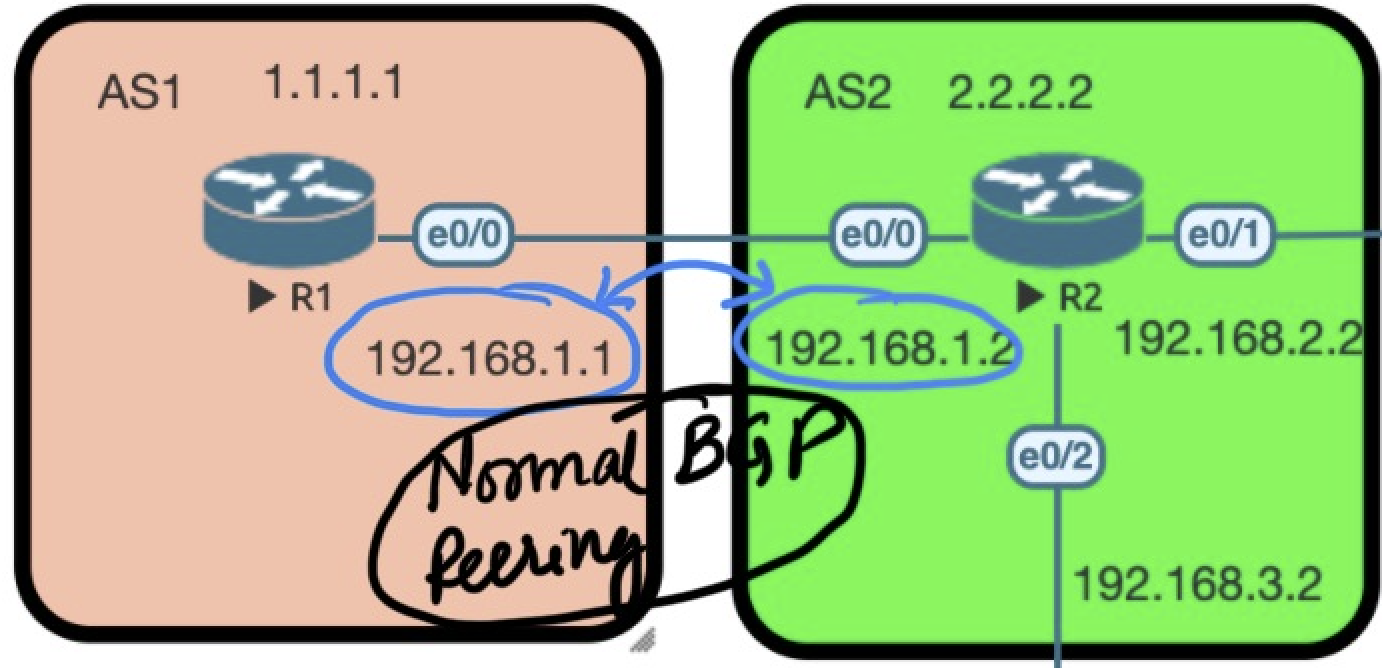 |
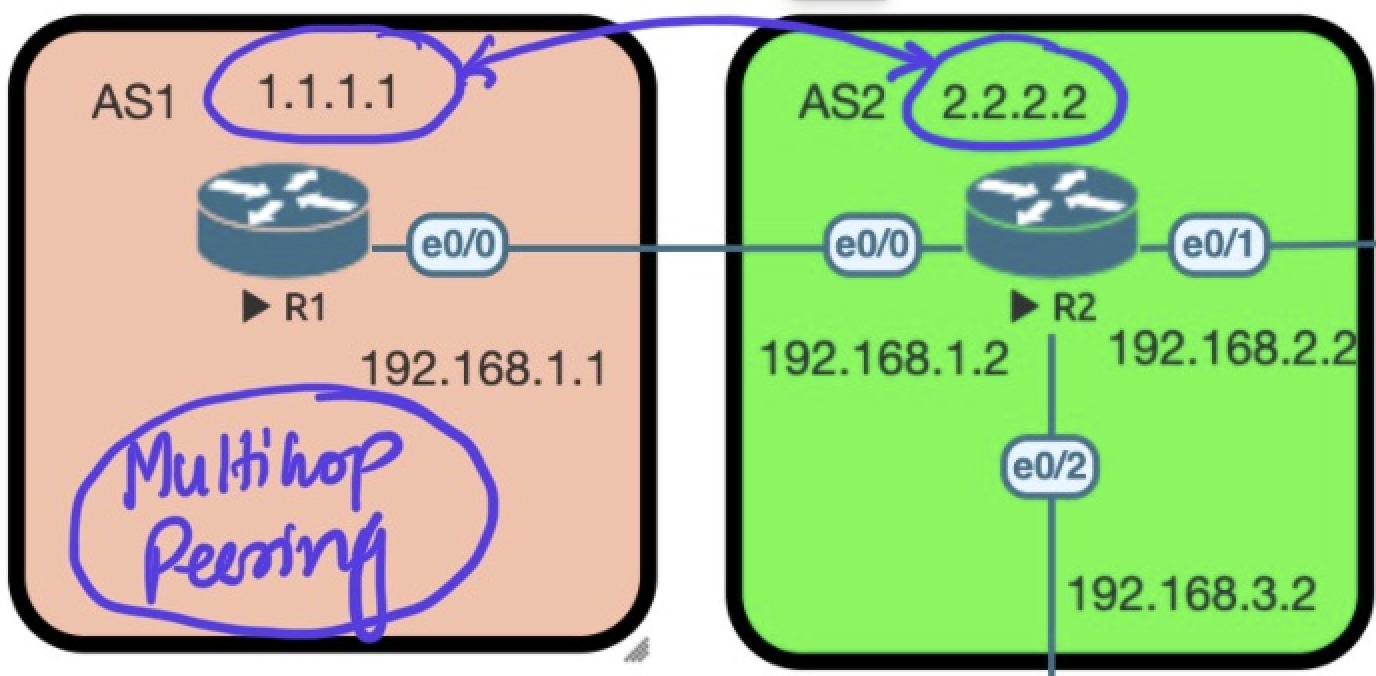 |
BGP uses a default TTL of 1, which means you must increase it when peering across multiple hops. Note: TTL adjustment is required for eBGP only — iBGP does not require it.
You know from the above exercises that peering between R1 and R2 can be directly done with the following:
# R1
router bgp 1
 neighbor 192.168.1.2 remote-as 2 # First you configure the Remote AS
 network 1.1.1.1 mask 255.255.255.255 # Second you adverstise the Route into BGP

# R2
router bgp 2
 neighbor 192.168.1.1 remote-as 1
...
But instead of using the directly connected interface IP address for neighbors , you can alternatively use the loopback address of the router as the neighbor address. The example below demonstrates this.
# R1

ip route 2.2.2.2 255.255.255.255 192.168.1.2 # First point how to reach to 2.2.2.2

router bgp 1
 neighbor 2.2.2.2 remote-as 2 # Second you configure the Remote AS
 neighbor 2.2.2.2 update-source loopback 0 # Third you define the source interface where the packets would originate from
 neighbor 2.2.2.2 ebgp-multihp 2 # Fourth you increase the TTL to 2
 network 1.1.1.1 mask 255.255.255.255 # FInally you adverstise the Route into BGP

# R2

ip route 1.1.1.1 255.255.255.255 192.168.1.1 # First point how to reach to 1.1.1.1


router bgp 2
 neighbor 1.1.1.1 remote-as 2 # Second you configure the Remote AS
 neighbor 1.1.1.1 update-source loopback 0 # Third you define the source interface where the packets would originate from
 neighbor 1.1.1.1 ebgp-multihp 2 # Fourth you increase the TTL to 2
...
Why do we need Internal BGP (iBGP)!
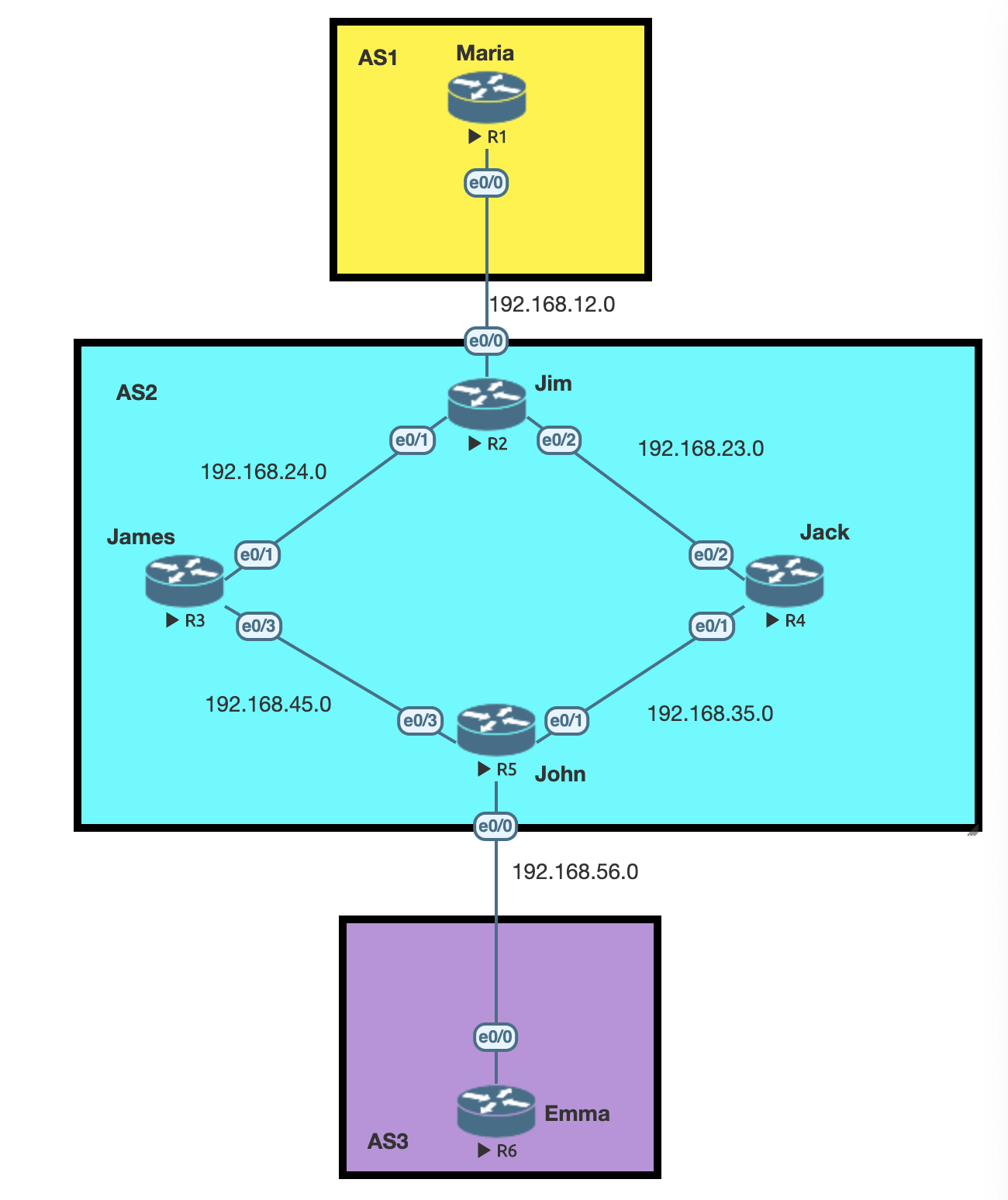
Step 1. eBGP (Between two different AS) is configured between AS1 and AS2 AND AS3 and AS2.
Step 2. A local route 6.6.6.6 is created on R6 and the goal is for this route to show up in R1’s routing table.
Step 3. For that we need to configure iBGP between R5 and R2.
Step 4. Cannot configure direct iBGP neighborships between R5 and R2 yet — there is no routing between them.
Step 5. OSPF between R2 , R3 , R4 , R5 is configured to get the path set between R5 and R2.
Step 6. Now instead of BGP peering on physical interfaces we create loopback interfaces on R5 and R2 for peering.
- Step a. When we do the above it look like the following:
Notice the
BGP AS numberand theremote-asare same! (iBGP!)R2(config)#router bgp 2 R2(config-router)#neighbor 5.5.5.5 remote-as 2 R5(config)#router bgp 2 R5(config-router)#neighbor 2.2.2.2 remote-as 2 - Step b. Configure the main settings when you source bgp via a loopback interface
	 neighbor x.x.x.x update-source loopback 0 # You define the source interface where the packets would originate from
	```

- **Step 7.** After Step 6, the path to 6.6.6.6 is visible in R2's BGP table but cannot be reached. Notice the difference between `* i` and `*>`:

	- **`* i`** — BGP is aware of the route but it is not installed in the routing table. R2's next-hop is `192.168.56.6`, which it cannot reach (the earlier OSPF configuration does not cover this path).

	- **`*>`** Means's that the route is known and it is installed in the routing table and CAN be reached ! R5 knows about `192.168.56.6` as its was advertised via the prior eBGP configuration .

```console
	R2#sh ip bgp
	BGP table version is 1, local router ID is 2.2.2.2
	     Network          Next Hop            Metric LocPrf Weight Path
	 * i  6.6.6.6/32       192.168.56.6             0    100      0 3 i
	```

```console
	R5#sh ip bgp
	BGP table version is 2, local router ID is 5.5.5.5
	     Network          Next Hop            Metric LocPrf Weight Path
	 *>   6.6.6.6/32       192.168.56.6             0             0 3 i
	```

- **Step 8.** Now we will add the networks `192.168.56.6` and `192.168.12.0` in to the BGP for AS2

```console
	R2(config)#router bgp 2
	R2(config-router)#network 192.168.12.0 mask 255.255.255.0

	R5(config)#router bgp 2
	R5(config-router)#network 192.168.56.0 mask 255.255.255.0
	```

- **Step 9.** Righ after we configure the above the route to 6.6.6.6 becomes active on R2!

```console
	R2#sh ip bgp
	BGP table version is 7, local router ID is 2.2.2.2
	Status codes: s suppressed, d damped, h history, * valid, > best, i - internal,
	              r RIB-failure, S Stale, m multipath, b backup-path, f RT-Filter,
	              x best-external, a additional-path, c RIB-compressed,
	              t secondary path,
	Origin codes: i - IGP, e - EGP, ? - incomplete
	RPKI validation codes: V valid, I invalid, N Not found

	     Network          Next Hop            Metric LocPrf Weight Path
	 *>i  6.6.6.6/32       192.168.56.6             0    100      0 3 i
	 *>   192.168.12.0     0.0.0.0                  0         32768 i
	 *>i  192.168.56.0     5.5.5.5                  0    100      0 i
	```

- **Step 10.** Now , at this stage the output says that `6.6.6.6` can be reached via the next hop `192.168.56.6` ; so how do we reach `192.168.56.6` ?

```console
	R2#sh ip route  | inc 56.0
	B     192.168.56.0/24 [200/0] via 5.5.5.5, 00:04:29
	R2#sh ip route 5.5.5.5
	Routing entry for 5.5.5.5/32
	  Known via "ospf 1", distance 110, metric 21, type intra area
	  Last update from 192.168.23.4 on Ethernet0/2, 00:54:34 ago
	  Routing Descriptor Blocks:
	  * 192.168.24.3, from 5.5.5.5, 00:54:34 ago, via Ethernet0/1
	      Route metric is 21, traffic share count is 1
	    192.168.23.4, from 5.5.5.5, 00:54:34 ago, via Ethernet0/2
	      Route metric is 21, traffic share count is 1
	```

- **Step 11.** As we can see in the above output the path to reach 6.6.6.6 is via R3 or R4 . Now lets say the packet reaches R3 or R4 ; do R3 or R4 know about the destination `6.6.6.6`.

```console
	R3#sh ip route 6.6.6.6
	% Network not in table
	```

```console
	R4#sh ip route 6.6.6.6
	% Network not in table
	```

> **Key Learning Objective with this : Even if the path is known and is in the routing table its NOT reachable , this is unlike other routing protocols!**

---
### BGP Loop Prevention
**`BGP Loop Prevention`** : *<span style="color:blue">If you see your own AS number in the AS path you don’t accept it since <span style="color:red">it means there is a loop.*

Ok so ; with the **above logic** how would loop be prevented in case of `iBGP` **?**

```console
R2(config)#router bgp 2
R2(config-router)#neighbor 5.5.5.5 remote-as 2
We have all the routers in the the same AS! The solution is simple:
When a BGP router receives an update from another internal BGP router **it will not forward this information to another internal BGP router**. This is called BGP **
split-horizon**.
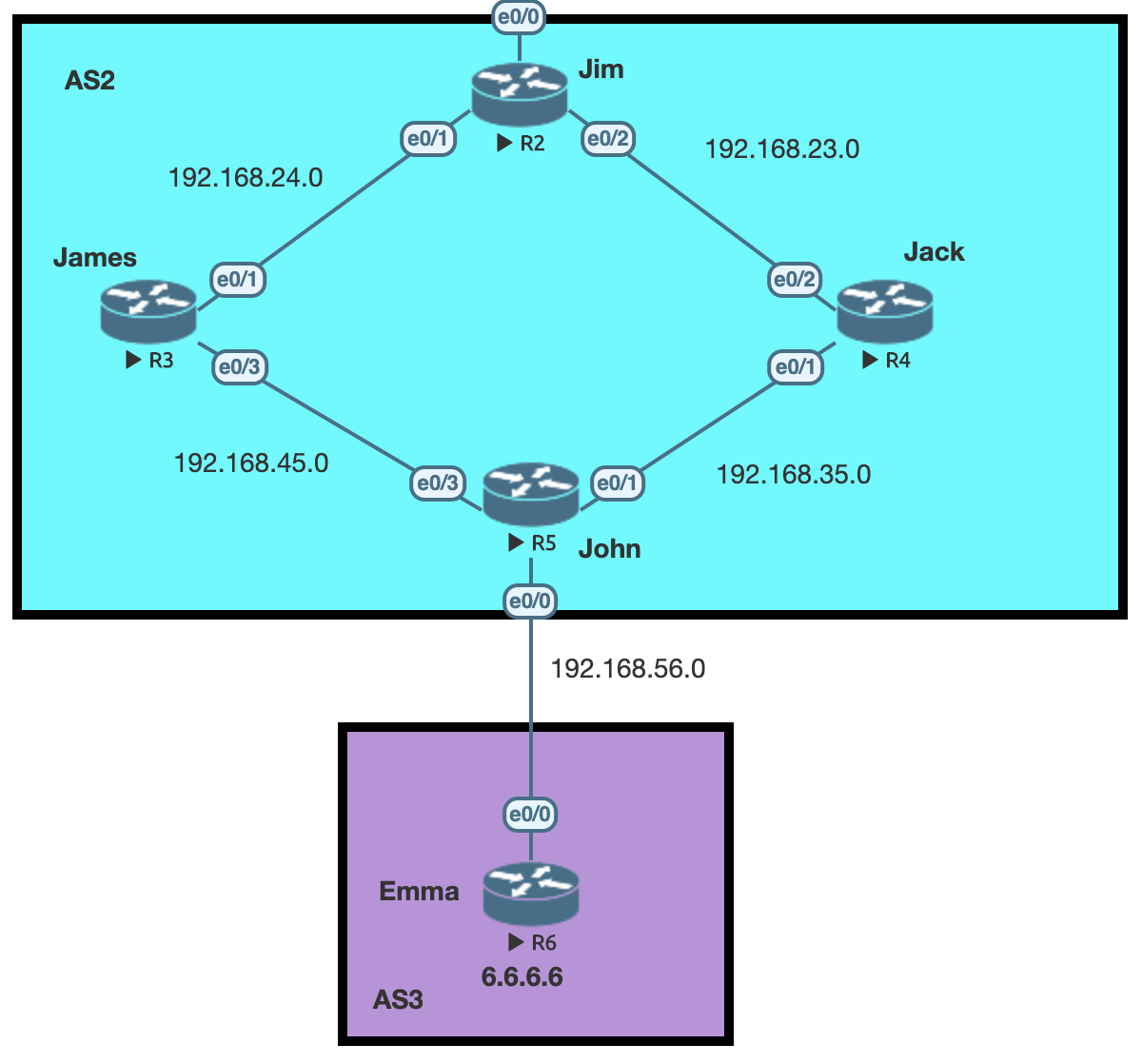
Continuing the topic of loop prevention , lets understand the same in our example :
R5knows about the network6.6.6.6as it learned it from eBGP ( between two different AS)- An
iBGPsession was set betweenR2andR5so that network behindR2can reach6.6.6.6 R2learn about6.6.6.6, but never installs it in the routing table as th next hop192.168.56.0network isn’t reachable (no distributed in the OSPF area intentionally)- If we configure iBGP between
R2–R3orR2–R4, neitherR3norR4will learn the6.6.6.6route fromR2— because of iBGP split-horizon,R2will not re-advertise it to other iBGP peers.
So, basically a full mesh have to be configured in iBGP peers
next-hop-self
The default next hop behavior of BGP is different than any IGP. Internal BGP does not change the next hop IP address.
In the above example for R5 , 6.6.6.6 is reachable via 192.168.56.6 ; Now when R5 advertises this route to R3 ; it DOES NOT change the next hop!
As long as R5 knows about the path to the advertised next-hop in this case 192.168.56.6 ; its fine.
But , if you would like to change this behaviour ; you use the command :
R5(config)#router bgp 2
R5(config-router)#neighbor 4.4.4.4 next-hop-self
R5(config-router)#neighbor 3.3.3.3 next-hop-self
With the above configuration
R3#show ip route bgp | include 6.6.6.0
B 6.6.6.0 [200/0] via 5.5.5.5, 00:00:37
Notice how the next hop has changed to R5 itself ; which looked like the following before the change:
R3#show ip route bgp | include 6.6.6.0
B 6.6.6.0 [200/0] via 192.168.56.6, 00:00:37
BGP Attribute and Path Selection
In the BGP table we see multiple path to the same destination.
In the example below we have multiple paths to the 6.6.6.6 network shown
R2#sh ip bgp
BGP table version is 7, local router ID is 2.2.2.2
Status codes: s suppressed, d damped, h history, * valid, > best, i - internal,
              r RIB-failure, S Stale, m multipath, b backup-path, f RT-Filter,
              x best-external, a additional-path, c RIB-compressed,
              t secondary path,
Origin codes: i - IGP, e - EGP, ? - incomplete
RPKI validation codes: V valid, I invalid, N Not found

     Network          Next Hop            Metric LocPrf Weight Path
 *i  6.6.6.6/32        192.168.56.6             0    100      0 3 i
 *   		       192.168.12.0             0         32768 i
 *>i       	       192.168.56.0             0    100      0 i
As a reminder, only the path marked > is installed in the routing table — that is BGP’s best path. All other routes remain in the BGP table.
Why did BGP select the above path as the the best one :
| Priority | Attrribute |
|---|---|
| 1 | Weight (highest) |
| 2 | Local Preference (Highest) |
| 3 | Originate (Local Originate) |
| 4 | AS Path (shortest) |
| 5 | Origin Code (IGP < EGP < Incomplete) |
| 6 | MED (lowest) |
| 7 | Paths (External preferred over internal) |
| 8 | Router ID |
Weight
In the example below , we configure different weights on the router 7.7.7.7 to the path 2.2.2.2 reachable via 2 different paths. The path via 9.9.9.9 is chosen because its weight is set to 500, which is higher than the other link:
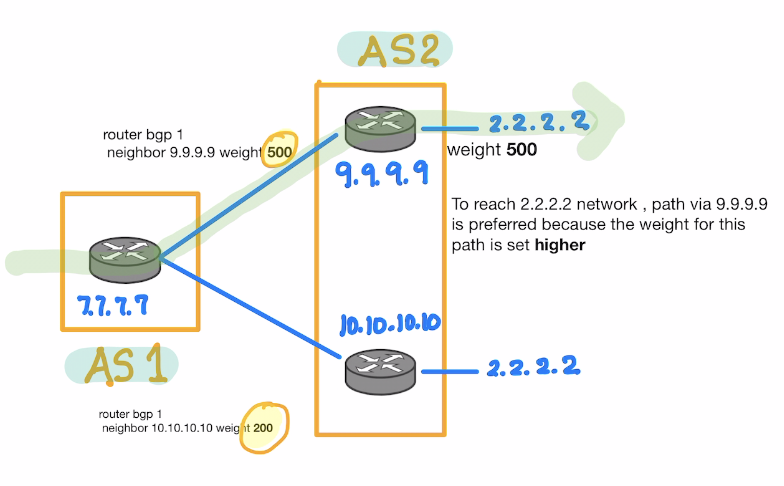
router bgp 1
 neighbor 9.9.9.9 weight 500
route-maps
Now in the above example lets say with 2.2.2.2 network there were more networks behind AS2 , example 3.3.3.3 or 4.4.4.4. How do we selectively increase choose the path for a specific network prefix ?
router bgp 1
 no neighbor 9.9.9.9 weight 500
!Create route-map to selectively set the weight for interested traffic

route-map SETWEIGHT permit 10
 match ip address 10
 set weight 400
 exit
route-map SETWEIGHT permit 20
 set weight 0
 exit
access-list 10 permit 3.3.3.3 0.0.0.255

!BGP Config
router bgp 1
 neightbor 9.9.9.9 route-map SETWEIGHT in
Local Preference
A local-prefrence is respected within an AS (iBGP)
It is exhnaged between all iBGP routers.
In the example below for the path from R4 to 2.2.2.2 we chnages the local-preference on R3 , which increase its local preference from a default of 100 to 600 and hence the path via it is preffered.
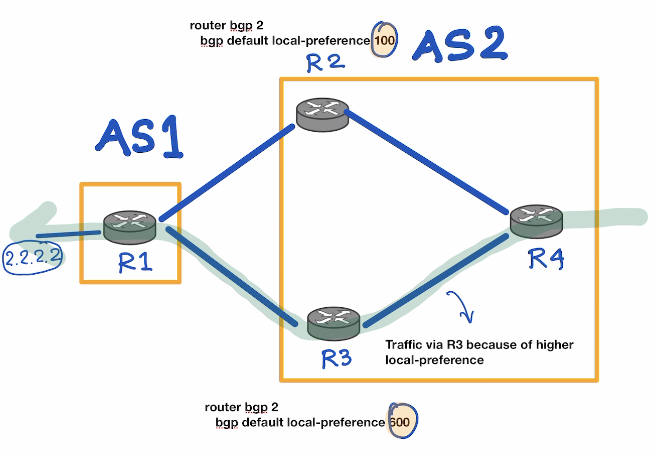
A local preference can be set at the BGP level
router bgp 1
 bgp default local-preference 600
Or slectively via route-maps
route-map SETWEIGHT permit 10
 match ip address 10
 set local-preference 600
 exit
Originate
The meaning of this paramater is that the BGP router will prefer a router if its locally originated ; means the next hop IP Address is 0.0.0.0
AS Path Prepend
BGP preferes the path with the shorter number of hops (AS Path) The AS Path can be increased for a given prefix (by adding our own AS number multiple times) which makes path longer and less preffered over the other availaible path.
AS Path Prepend is advertised to the remote AS , faking the path as longer towards the AS , causing the remote AS to choose another path.
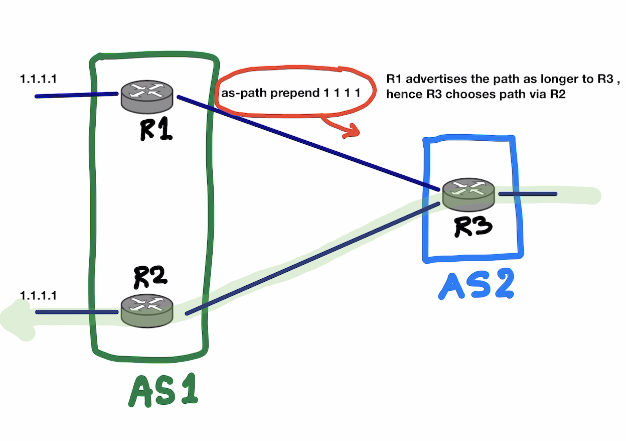
Since you are Sending this to your neighbor ; in the route-map it should be applied as out
!Set the AS Path
route-map PREPEND permit 10
set as-path prepend 1 1 1 1 1
exit

!Configure it in BGP
router bgp 1
 neighbor 192.168.12.2 route-map PREPEND out
Origin Code
How the route originated in the BGP network in the first place.
For example , when you spin up a BGP process on a router ; after defining the neighbor ; you configure the network which needs to be advertised on the BGP Process . e.g:
R5(config)#router bgp 2
R5(config-router)#network 192.168.56.0 mask 255.255.255.0
In the above example we advertise the network 192.168.56.0 in the BGP Process. In the BGP table this network will be shown as "i"
If a you do the following (redistribute-connected) you are not being specific and hence the route will be treated as a "?"
R5(config)#router bgp 2
R5(config-router)#redistribute connected
R2#sh ip bgp
BGP table version is 7, local router ID is 2.2.2.2
Status codes: s suppressed, d damped, h history, * valid, > best, i - internal,
              r RIB-failure, S Stale, m multipath, b backup-path, f RT-Filter,
              x best-external, a additional-path, c RIB-compressed,
              t secondary path,
Origin codes: i - IGP, e - EGP, ? - incomplete
RPKI validation codes: V valid, I invalid, N Not found

     Network          Next Hop            Metric LocPrf Weight Path
 *i  6.6.6.6/32        192.168.56.6             0    100      0 3 i
 *   1.1.1.1	       192.168.12.0             0    32768        ?
MED Attribute
-
MED(Metric) is advertised to your neighbor on how they should enter your AS. -
Local Preferenceis used for outbound traffic ,MEDis used for inbound traffic. - MED is exchnaged between autonomous systems
- Lowest MED is the preffered.
- MED is propagated to all routers in the neighbor AS , but is not passed out to other AS
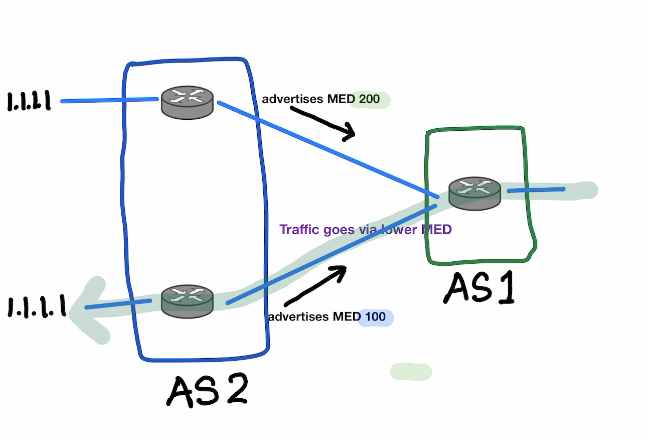
!Set the MED
route-map MED permit 10
set metric 100
exit

!Configure it in BGP
router bgp 1
 neighbor 192.168.12.2 route-map MED out
PATHs
BGP will prefer external paths (external BGP) over internal paths (internal BGP).
Router ID
The last BGP attribute is router ID. If everything is the same then the router ID will be the decision maker. The router with the lowest router ID will be used for the path.


